The DualShield IIS Agent is the bridge between the user and the DualShield SSO server. When a user wants to login to a web application secured by the DualShield IIS Agent, the user will be redirected to the DualShield SSO server so that the user will be verified and authenticated. In other words, the DualShield SSO server needs to be accessible by the users from the public network.
If you do not want to expose the DualShield SSO server to the public network, for reasons such as that your DualShield SSO server does not have a public FQDN, or it does not have a commercial certificate, then you can take advanatge of the IIS Reverse proxy function. By using the IIS reverse proxy, to the users, your DualShied SSO seems to be an integrated part of your web application. The IIS Reverse proxy not only saves you from publishing your DualShield SSO server, it alslo gives better user experience to users.
To enable the reverse proxy function in the IIS server, follow steps below.
Select the web server (not a web site or virtual directory) node node (under "Start Page" if it is the first web server) from the list on the left pane in the IIS manager windowManager console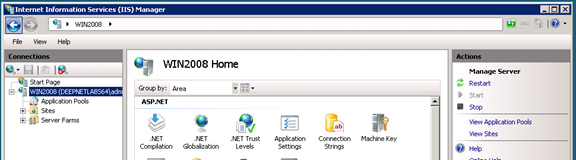
In the "features view" window (the window in the middle), find "Application Request Routing" and double click it
On the right pane, find the "Server Proxy Settings..." link and click it
Back to the middle pane, tick (enable) the first check box, "Enable Proxy"
Click "Apply" on the left hand side window to save the change.