...
For my test I am just using the inbuilt Self Signed.

Create
...
Virtual Services with TLS Termination
A DualShield server hosts a number of services. Each services works on a specific port. Below is a list of DualShield services and their port numbers:
| Service Name | Port | Short Name |
|---|---|---|
| Administration | 8070 | |
| Authentication | 8071 | |
| Provision | 8072 | DPS |
| Management Console | 8073 | DMC |
| SSO Service | 8074 | SSO |
| SSO Management | 8075 | |
| Self-Service Console | 8076 | DSS |
We will create a service in the load balancer for each of the above DualShield service For my exampole I am going to create a Virtual Service for Ports 8073 and 8074.Tha Management Console and Single Sign on Ports, respectively.
Navigate to "Load Balancing > Service Groups", click "Add".
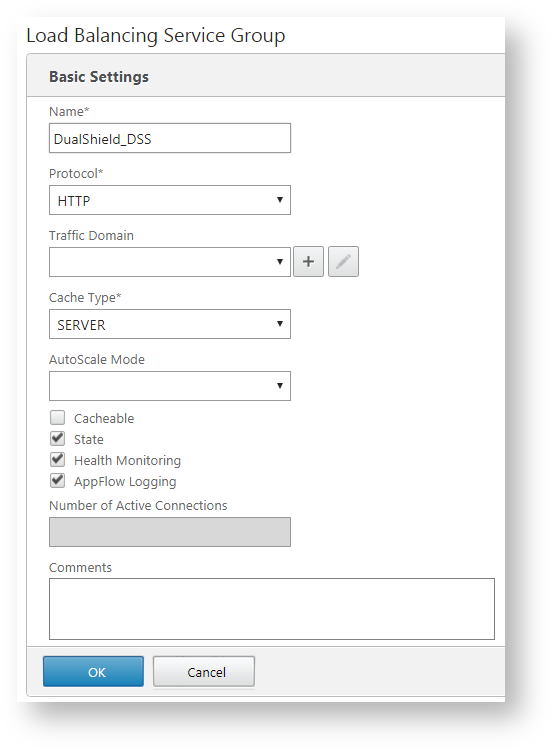
As an example, will will create a service for DSS. Enter the name and select "HTTP" as the protocol.
Click "OK".
Now click in the area where it shows "Service Group Member".
...
Virtual Services > View/Modify Services".

Click "Add New" from either in the main menu or within View/Modify Services screen

Now specify the Virtual IP address you wish to use, The Port number (In my example I shall use Port 8073) and the Protocal will be TCP

Click on Add This Virtual Service on the bottom right.
This will take you to the Layer 7 properties screen...

We are going to add real servers.
...