...
15. In the Type field, select SAML 2.0

16. Click on 
17. Open the SAML metadata file you downloaded from the Citrix Cloud, in a text editor..

18. Select all and copy and past into the Service Provider Metadata box on DualShield.

19. Click Save
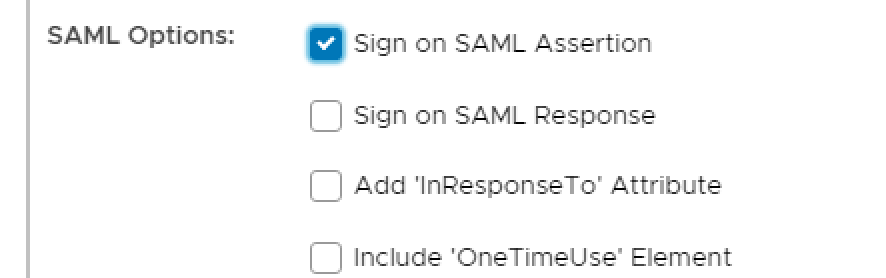
20. Enable Sign on SAML Assertion under SAML Options
21. Click on Attributes tab at the top

We are now going to add the following attribute names which are required by the Service Provider.
cip_email
cip_upn
cip_oid
cip_sid
With the exception of cip_sid the above attributes will be mapped to their counterpart DualShield Identity Attributes which in turn are mapped to the Active Directory account attributes.
For example:
Citrix SAML Attribute | DualShield Identity Attribute | AD Account Attribute |
cip_email | ||
cip_upn | userPrincipalName | userPricipalName |
cip_oid | uuid | ObjectGUID |
In steps 1-5 you created a new Identity Attribute called objectSID. This will be specified in a script which will be applied to the cip_sid Citrix Attribute
22. Click Create

23. On the Attributes builder specify Location as HTTP Body and enter cip_upn as the name for this attribute.

24. Click on the search symbol to the right of the Maps To field.

25. Select the identity source that will be used and select User Principal Name from the Maps to drop down list:

26. Click Save
27. Click Save again
28. Repeat steps 21 - 23 but this time name the attribute cip_oid

29. Repeat steps 24 & 25 but this time map to Unique Identifier

30. Click Save
31. Click Save again
32. Repeat the process above, one more time. Name the attribute cip_email and map to email.

33. For cip_sid, create a new attribute and name it cip_sid

34. Under the Value group box, select Script

35. Copy and paste the following script into the text box.
| Wiki Markup |
|---|
if (!objectSid) return null;
\\
byte\[\] sid = objectSid.decodeHex();
\\
if (sid.length<8 || sid.length % 4 != 0) return "";
\\
StringBuilder sb = new StringBuilder();
sb.append("S-").append(sid\[0\]);
int c = sid\[1\]; // Init with Subauthority Count.
\\
// Default order is BIG_ENDIAN
java.nio.ByteBuffer bb = java.nio.ByteBuffer.wrap(sid);
sb.append("-").append((long)bb.getLong() & 0XFFFFFFFFFFFFL);
bb.order(java.nio.ByteOrder.LITTLE_ENDIAN); // Now switch.
\\
for (int i=0; i<c; i++) \{ // Create Subauthorities.
    sb.append("-").append((long)bb.getInt() & 0xFFFFFFFFL);
\}
return sb.toString(); |
...