...
Depending on how your replication was setup set up channel names may have been included per node. Usually your primary server will have the channel name 'server-1' and the secondary server will have the name 'server-2' However if you are not sure this can be easily identified by login onto MySQL o on each server and using the show slave status command..
| Expand | |||||||
|---|---|---|---|---|---|---|---|
| |||||||
Log into MySQL console on both machines, and run the show slave status query...
|
You will see something like this..
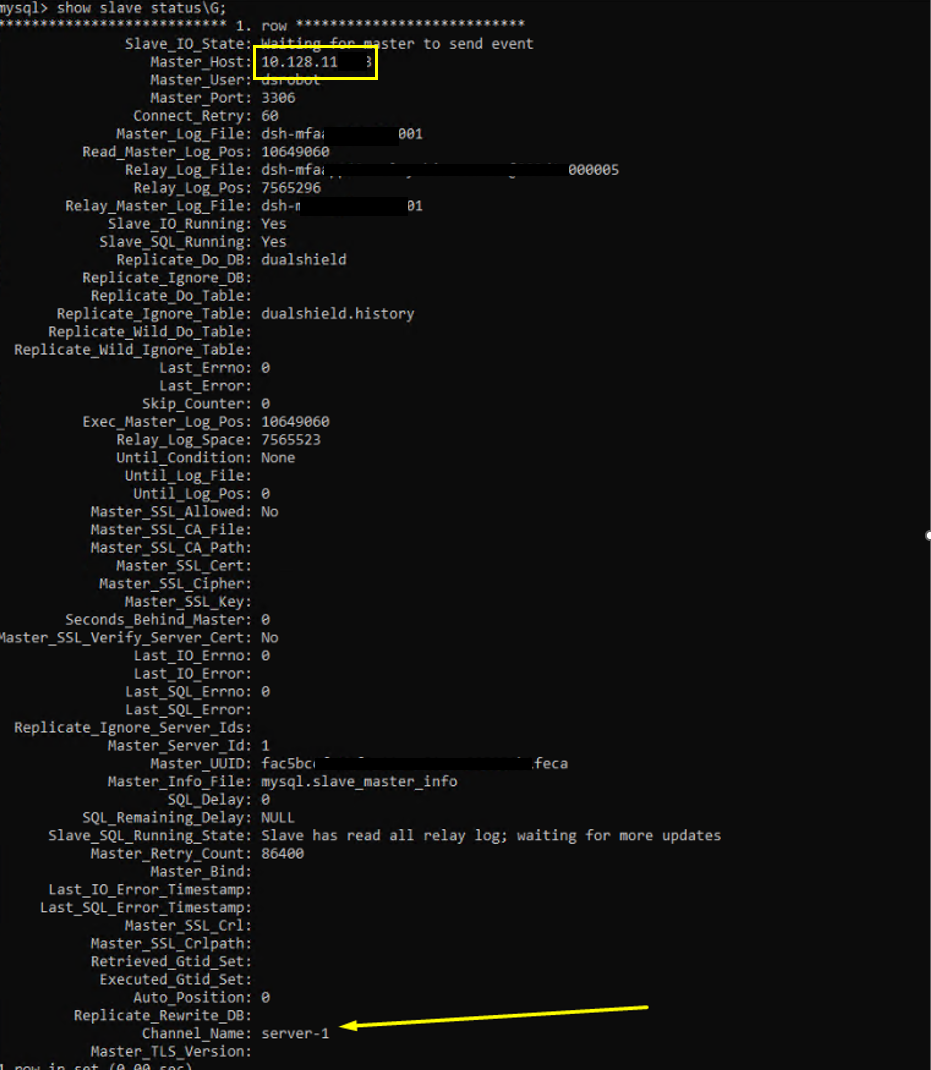
You can see the channel name at the bottom, which corresponds with the Master Host IP at the top. Please take a note of this before continuing.
Stop Replication between both servers
...
You can literally copy and paste this CHANGE MASTER TO query statement to but you should also add the 'FOR CHANNEL statement at the end. You can usually Hopefully you will have already obtained the channel names using the show slave status command, as instructed earlier on in this wiki guide.
For example the CHANGE MASTER TO statement here would be.
| Code Block | ||||
|---|---|---|---|---|
| ||||
mysql> CHANGE MASTER TO MASTER_LOG_FILE='DAS111.000017', MASTER_LOG_POS=154 FOR CHANNEL 'Server-1'; |