...
| Code Block | ||||
|---|---|---|---|---|
| ||||
mysql -u root -p (Enter your password at prompt) mysql> use dualshield; mysql> stop slave; |
Take a snapshot of the database on Server-1
Open an elevated command prompt and change directory to C:\Program Files\Deepnet DualShield\mysql\bin
Copy and paste in the following command:
| Code Block | ||||
|---|---|---|---|---|
| ||||
mysqldump -uroot -p --skip-lock-tables --single-transaction --flush-logs --hex-blob --master-data=2 dualshield > c:\path-to\backup.sql |
(The path and backup file name can be modified as required)
Hit return and enter the password when prompted. Hit return again. The process may take a few minutes, but when you see the curser again, it means the snapshot has been taken.
Type the following to reset slave:
| Code Block | ||||
|---|---|---|---|---|
| ||||
mysql> reset slave; |
Restore the snapshot to Server-2
Stop the DualShield Server Service on server-2 only
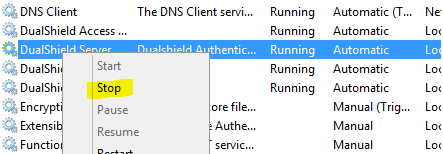
Type the following query in the MySQL console to delete the current dualshield database:
| Code Block | ||||
|---|---|---|---|---|
| ||||
mysql> drop database dualshield; |
Create a new database:
| Code Block | ||||
|---|---|---|---|---|
| ||||
mysql> create database dualshield CHARACTER SET utf8 COLLATE utf8_general_ci; |
Import the database you copied over from Server-1.
Open an elevated command prompt and change directory to C:\Program Files\Deepnet DualShield\mysql\bin
Type the command:
| Code Block | ||||
|---|---|---|---|---|
| ||||
mysql -u root -p DualShield < c:\path-to\backup.sql |