...
| width | 30 |
|---|
...
| width | 70% |
|---|
...
| title | LDAP connection lost |
|---|
| Panel | ||||||
|---|---|---|---|---|---|---|
| ||||||
This alert is triggered when the system detects a loss of connection between DualShield and the external AD/LDAP server cluster. |
...
| title | License has expired |
|---|
| Panel | ||||||
|---|---|---|---|---|---|---|
| ||||||
This alert is triggered if an expired license has been found during processing of the task "System health check". |
...
| title | License is about to expire |
|---|
| Panel | ||||||
|---|---|---|---|---|---|---|
| ||||||
This alert is triggered if a license has been found that is about to expire during processing of the task "System health check". |
...
| title | User Locked |
|---|
| Panel | ||||||
|---|---|---|---|---|---|---|
| ||||||
This alert is triggered when a user locking event occurs during the authentication process. |
...
| title | Message gateway not available |
|---|
...
| borderColor | grey |
|---|---|
| bgColor | #F8F8F8 |
| borderStyle | dashed |
...
...
| title | DevicePass Registration |
|---|
| Panel | ||||||
|---|---|---|---|---|---|---|
| ||||||
This alert is triggered during DevicePass registration processing. |
...
| title | System process check alert |
|---|
| Panel | ||||||
|---|---|---|---|---|---|---|
| ||||||
This alert is triggered upon detection of a heavy load on the server. |
...
| title | License is approaching its limit |
|---|
| Panel | ||||||
|---|---|---|---|---|---|---|
| ||||||
This alert is triggered when the system has detected that you have nearly used all available user licenses. |
...
| title | New Device Sign-in Notification |
|---|
| Panel | ||||||
|---|---|---|---|---|---|---|
| ||||||
This alert is triggered when the authentication server detects that a new device was used during the authentication process. |
...
| title | DeviceID Registration |
|---|
| Panel | ||||||
|---|---|---|---|---|---|---|
| ||||||
This alert is triggered when the authentication server detects that a new device has been registered. |
...
| title | Certificate has expired |
|---|
| Panel | ||||||
|---|---|---|---|---|---|---|
| ||||||
This alert is triggered when the authentication server detects that a certificate has expired during processing of the task "System health check". |
...
| title | Certificate is about to expire |
|---|
| Panel | ||||||
|---|---|---|---|---|---|---|
| ||||||
This alert is triggered when the authentication server detects that a certificate is about to expire during processing of the task "System health check". |
...
| title | Intrusion Alert |
|---|
| Panel | ||||||
|---|---|---|---|---|---|---|
| ||||||
This alert is triggered when a user locking event occurs during the authentication process. |
...
| title | Token/TokenAssignment disabled/enabled |
|---|
| Panel | ||||||
|---|---|---|---|---|---|---|
| ||||||
This alert is triggered when the authentication server upon detection of tokens (or token assignments) being either enabled or disabled. |
Creating and Editing Alerts
Editing an existing alert
A number of alerts are available to be customised for your use (the default alerts are listed above).
Alerts can be edited by left clicking on the context menu of the alert and selecting "Edit";
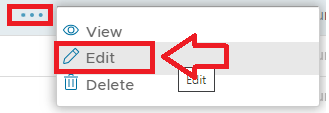
A new window will now open titled "Alert - Edit" that will allow you to specify the recipients of the alert, and what conditions trigger the execution of the alert.
Creating a new alert
As an alternative to editing a pre-existing alert you have the option to create a new alert by clicking on the  button;
...
Currently the only alert based on this template is the alert "Intrusion Alert".
Editing an existing alert
A number of alerts are available to be customised for your use (the default alerts are listed above).
Alerts can be edited by left clicking on the context menu of the alert and selecting "Edit";
A new window will now open titled "Alert - Edit" that will allow you to specify the recipients of the alert, and what conditions trigger the execution of the alert.
Specifying Alert Recipients
When the alert is triggered you have the option to send a message to specified recipients using the "Recipient Users" and "Recipient Groups" parameters.
...
| Include Page | ||||
|---|---|---|---|---|
|
Adding task execution to the alert
After the alert is triggered you have the additional option to cause one of the existing tasks to be run.
...