...
The first step required is a modification to the Windows Computer Logon registry key on the client computer, to control the behavior of the network drive mapping (NDM)
The key that needs to be changed is: Open regedit and go to Computer\HKEY_LOCAL_MACHINE\SOFTWARE\Deepnet Security\Windows Logon
Create a new sub-key called Computer Logon

Within the new key, add a All that is needed is to add an extra DWORD value called MFAforNDM with the value of 1;
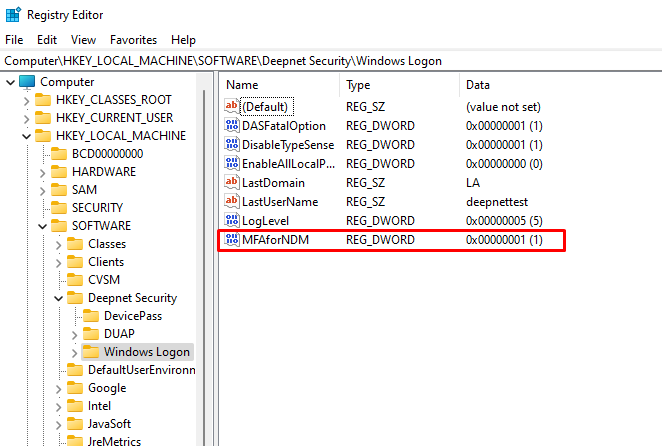

This change can be deployed through GPO: https://www.techcrafters.com/portal/en/kb/articles/how-to-add-edit-deploy-and-import-registry-keys-through-gpo#How_to_Add_Edit_a_Registry_Key_via_Group_Policy_Objects
...