...
In the DualShield Management Console, edit the logon procedure for your Juniper VPN application. You will need to define two logon steps: the first step requires users to enter their static password (AD password), which will also trigger the DualShield server to send the user’s on-demand password. The second step will then ask users to enter their on-demand password.
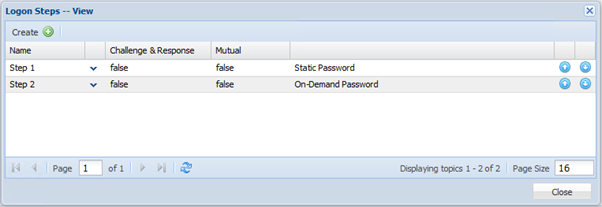
Configure Juniper
...
- Users will be first asked to enter their user name and AD password

- The user name and password will be submitted to the DualShield Server to be verified. When the DualShield has successfully verified the user and its password, it will generate an time-time password and send it to the user by SMS or email. The user will then be asked to enter the one-time password:

- Users will be first asked to enter their user name and AD password