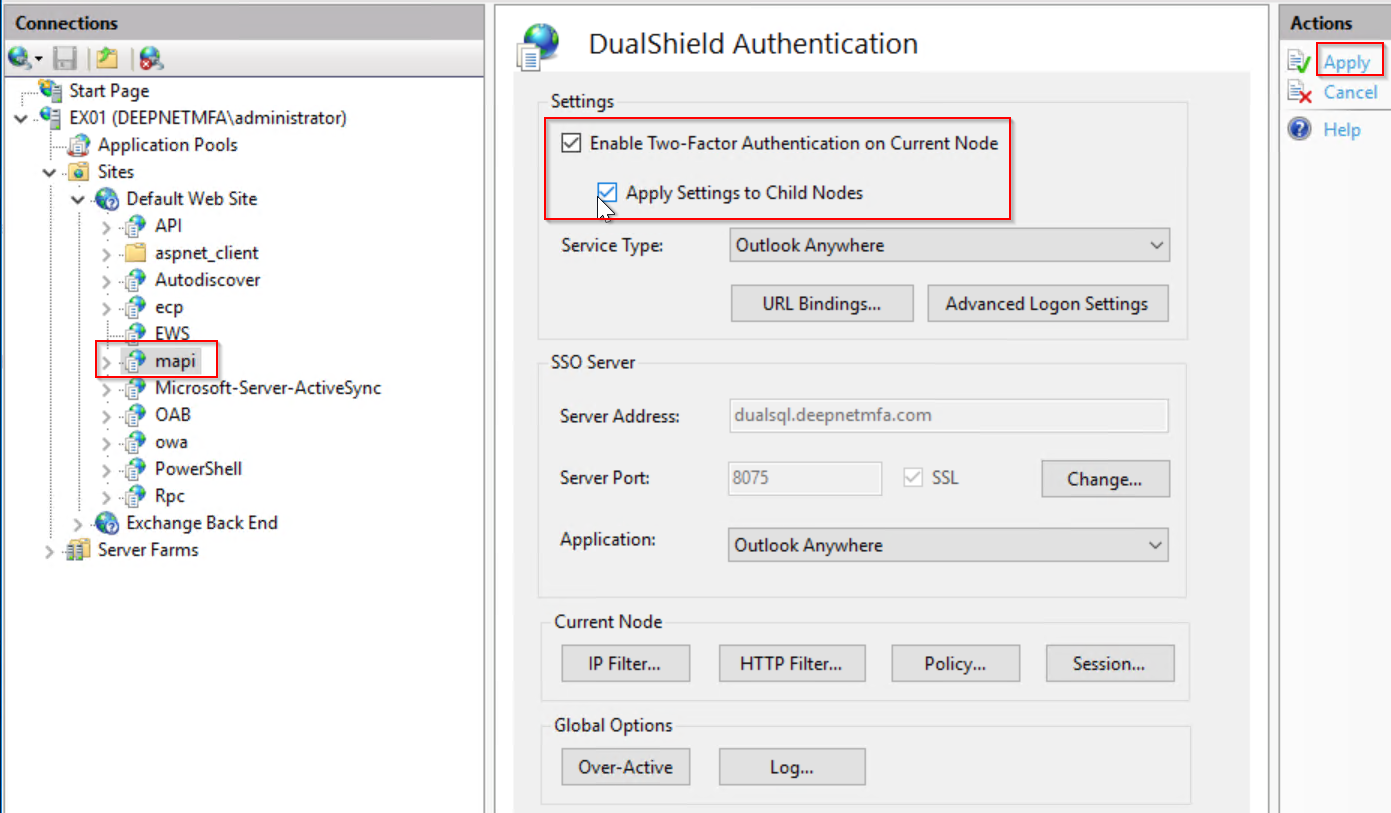
Once you have completed the configuration of MFA settings for Outlook Anywhere application, you are ready to turn on MFA on the application.
Select the "mapi" application node
Select both "Enable Two-Factor Authentication on Current Node" and "Apply Settings to Child Nodes"
Click "Apply" to apply settings.
Outlook Anywhere is now enabled with MFA.
Select the "EWS" application node
Select both "Enable Two-Factor Authentication on Current Node" and "Apply Settings to Child Nodes"

Click "Apply" to apply settings.
Outlook Anywhere is now enabled with MFA.
Select the "mapi" application node
Select both "Enable Two-Factor Authentication on Current Node" and "Apply Settings to Child Nodes"
Select the "RPC" application node
Select both "Enable Two-Factor Authentication on Current Node" and "Apply Settings to Child Nodes"
