This tutorial describes how to use DualShield's MySQL multi-source replication utility to create a multi-master replication system.
Preparation
- Download MySqlReplication.zip file to the primary server and extract the files to a folder, e.g. "C:\MySQLSetupMM". There are two files: MySQLSetupMM.ps1 and MySQLLocal.ps1 in the zip.
- Run PowerShell as the administrator on the primary server. Set-ExecutionPolicy RemoteSigned.

- Make sure your firewall is not blocking MySQL (default port 3306).
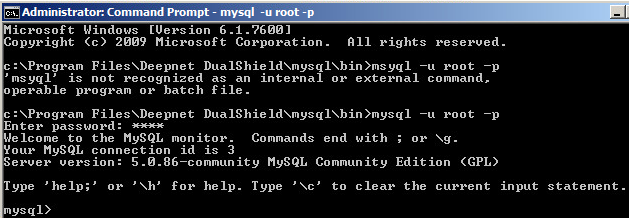
- Check your MySQL version and make sure it is 5.7.6 or later.
Configuration
- Stop the DualShield service on all servers (VERY IMPORTANT!)
- On the primary server, run PowerShell as the administrator. Change directory to the folder containing the replication utility files, i.e. "MySQLSetupMM.ps1" and "MySQLLocal.ps1"
- Execute the script file: "MySQLSetupMM.ps1". At the prompt, enter the IP address of each DualShield server, starting with the Primary server.
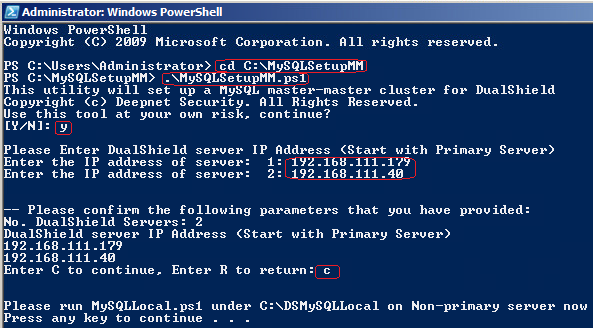
- Verify the parameters and press C to continue.
- A file called "MySqlLocal.ps1" will be created on every non-primary server in the folder called "C:\DSMySQLLocal".
- On each non-primary server, right click "MySQLLocal.ps1" script file and select "Run with PowerShell". (Make sure that you have followed point 2 in the preparation)
- Once "MySQLLocal.ps1" has been successfully executed on all non-primary server, return to the primary server and type any key to complete the setup.
- On every server, in MySQL command line, run "show slave status":
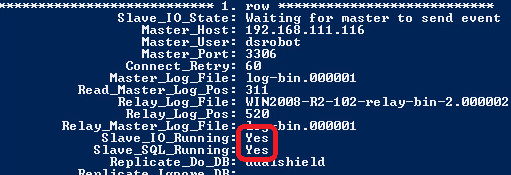
Both "Slave_IO_Running" and "Slave_SQL_Running" should be "Yes"
- Finally, start the DualShield service on all server machines.