Open a Remote Desktop Connection, establish the connection with a domain member computer, e.g. server2.qaworld.com
![DualShield MFA Platform > Test RD Connection [RDG] > image2017-8-4 12:15:30.png](/download/attachments/3362446/image2017-8-4%2012%3A15%3A30.png?version=1&modificationDate=1501845877000&api=v2)
It redirect to your RDGateway server, e.g. "server-1.qaworld.com".
![DualShield MFA Platform > Test RD Connection [RDG] > image2017-8-4 12:13:44.png](/download/attachments/3362446/image2017-8-4%2012%3A13%3A44.png?version=1&modificationDate=1501845877000&api=v2)
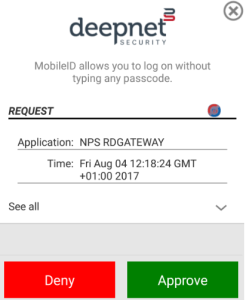
Enter the password, and you should receive the OOBA request from registered mobile device.
Click "Approve", and you are login to the remote computer via DualShield RADIUS 2FA authentication.
![]()