
Build an application for GoToMeeting integration, e.g. "GoToMeeting"
If you are not familiar with the process of building an application for SAML integration, please refer to the tutorial below:
You might want to create some customised policies for GoToMeeting integration. Please refer to the tutorial below:
Create a new Service Provider
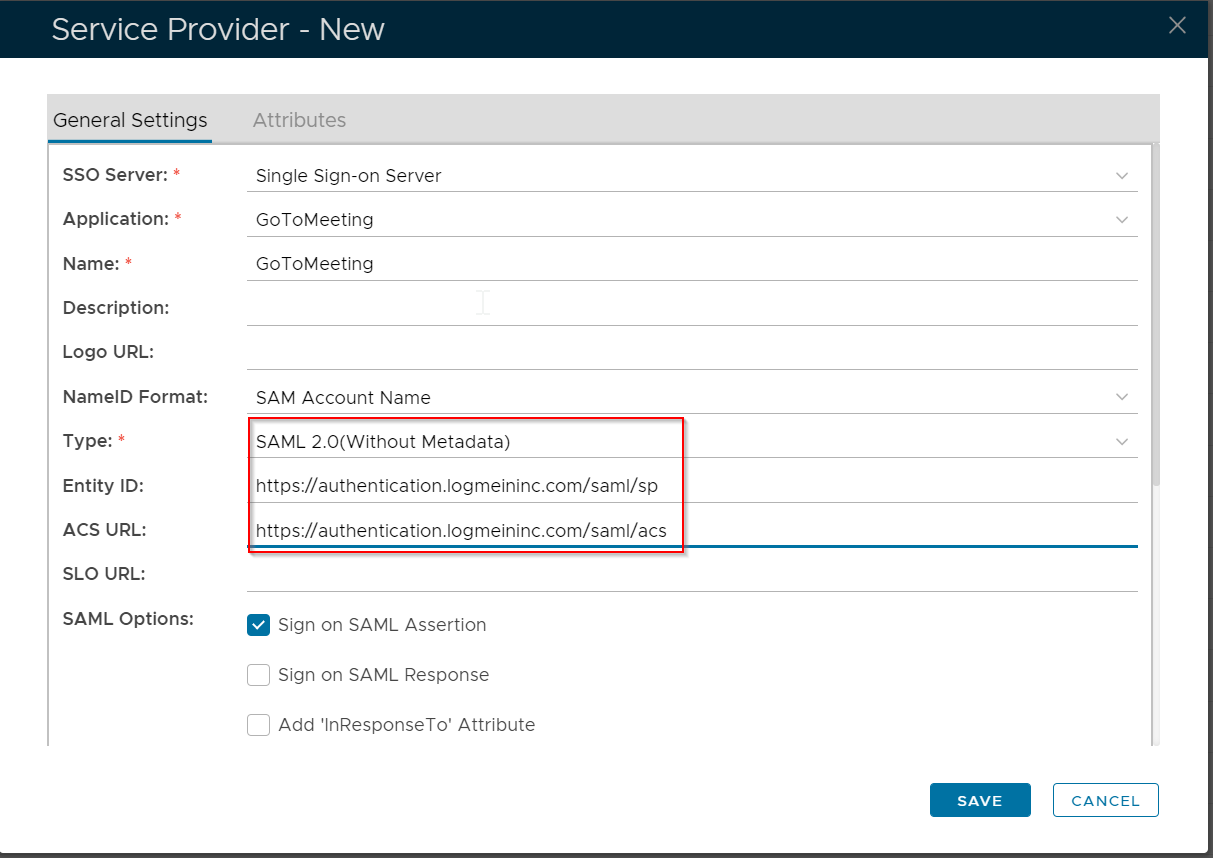
Entity ID: https://authentication.logmeininc.com/saml/sp
Assertion Consumer Service URL)
https://authentication.logmeininc.com/saml/acs
If you have set up Enterprise Sign-In and are interested in enforcing it as the only login method available when your users access their LogMeIn product account, please contact Customer Care by scrolling to the bottom of this article and selecting a contact option. Don't worry – once Enterprise Sign-In has been enforced in your account, your users' active sessions remain unaffected – they will just be prompted to use their company credentials upon their next login.
https://support.goto.com/meeting/help/enterprise-sign-in-g2m790099