- Navigate to "Identity Providers", click "Add Identity Provider | Create Third Party IDP"
- Fill in the name for "Identity Provider Name"
- Copy the "DualShield IdP Metadata" which downloaded earlier into the "SAML Metadata" field.
- In "Name ID Format" drop down list, select a format called:
. - In "Name ID Value" drop down list, select "userPrincipalName"
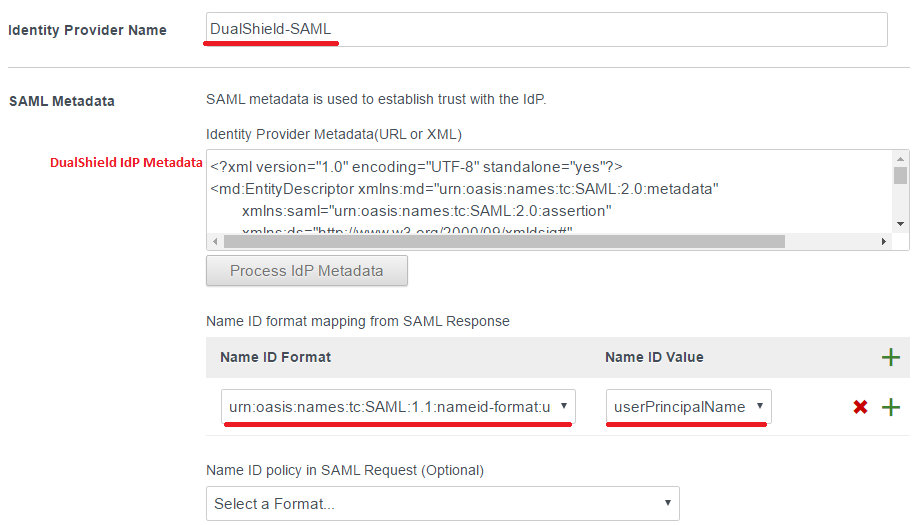
![DualShield MFA Platform > Create Identity Provider [vIDM] > image2017-2-9 16:59:41.png](/download/attachments/35947831/image2017-2-9%2016%3A59%3A41.png?version=1&modificationDate=1587386377000&api=v2)
- Do not enable the "Just-in-Time User Provisioning".
- Select which users can authenticate using this IdP, i.e. deepnet.com
- Set up the Network range.
![DualShield MFA Platform > Create Identity Provider [vIDM] > image2017-2-10 11:5:40.png](/download/attachments/35947831/image2017-2-10%2011%3A5%3A40.png?version=1&modificationDate=1587386377000&api=v2)
- Set the authentication methods, defined the "Authentication Methods", i.e. SAML and map to "SAML Context" called

![DualShield MFA Platform > Create Identity Provider [vIDM] > image2017-2-10 11:8:11.png](/download/attachments/35947831/image2017-2-10%2011%3A8%3A11.png?version=1&modificationDate=1587386377000&api=v2)
![DualShield MFA Platform > Create Identity Provider [vIDM] > image2017-2-10 11:9:3.png](/download/attachments/35947831/image2017-2-10%2011%3A9%3A3.png?version=1&modificationDate=1587386377000&api=v2)
- Enable Single Sign-Out Configuration
- Copy the "SingleSignOnService Location URL" in DualShield IdP Metadata which was downloaded earlier. i.e. "https://backdas.deepnet.com:8074/appsso/login?DASApplicationName=VMWare IDMGR" into "Redirect URL" field.
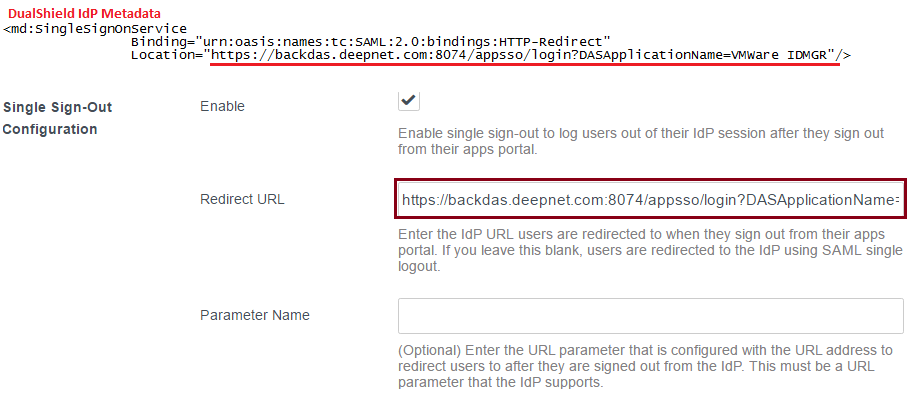
![DualShield MFA Platform > Create Identity Provider [vIDM] > image2017-2-10 15:28:31.png](/download/attachments/35947831/image2017-2-10%2015%3A28%3A31.png?version=1&modificationDate=1587386377000&api=v2)
- Download "Service Provider (SP) Metadata" and save into a local file.
![DualShield MFA Platform > Create Identity Provider [vIDM] > image2017-2-10 11:41:18.png](/download/attachments/35947831/image2017-2-10%2011%3A41%3A18.png?version=1&modificationDate=1587386377000&api=v2)
- Click "Save"