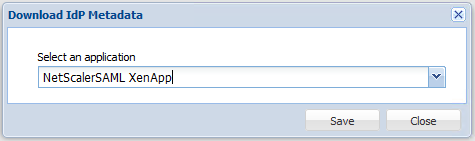
Log into the DualShield Authentication server, in the main menu, select “SSO”
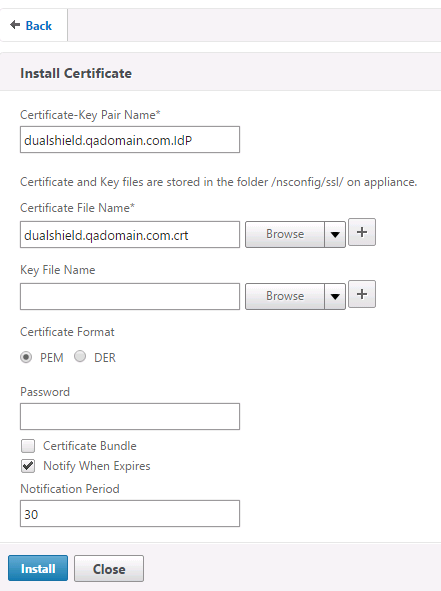
![DualShield MFA Platform > NetScaler Configuration [CTX-XA] > image2015-10-25 1:37:25.png](/download/attachments/35946923/image2015-10-25%201%3A37%3A25.png?version=1&modificationDate=1587385533000&api=v2)
![DualShield MFA Platform > NetScaler Configuration [CTX-XA] > image2014-4-27 10:58:30.png](/download/attachments/35946923/image2014-4-27%2010%3A58%3A30.png?version=1&modificationDate=1587385533000&api=v2)
Enter the "Name"![DualShield MFA Platform > NetScaler Configuration [CTX-XA] > image2015-10-25 1:50:32.png](/download/attachments/35946923/image2015-10-25%201%3A50%3A32.png?version=1&modificationDate=1587385533000&api=v2)
![DualShield MFA Platform > NetScaler Configuration [CTX-XA] > image2015-10-25 1:8:26.png](/download/attachments/35946923/image2015-10-25%201%3A8%3A26.png?version=1&modificationDate=1587385533000&api=v2)
![DualShield MFA Platform > NetScaler Configuration [CTX-XA] > image2015-10-25 1:2:48.png](/download/attachments/35946923/image2015-10-25%201%3A2%3A48.png?version=1&modificationDate=1587385533000&api=v2)
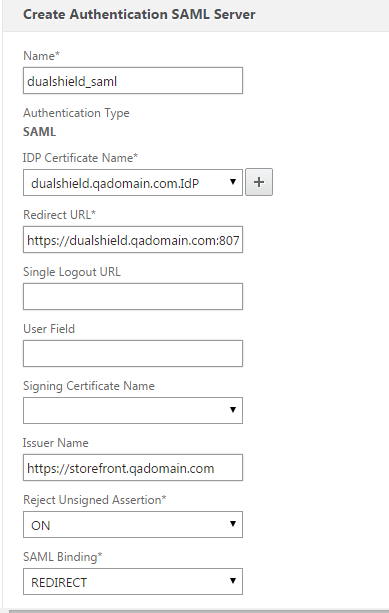
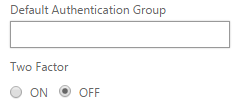
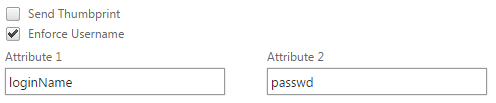
1. In the "Redirect URL" field, enter the URL below: http://dualshield.qadomain.com:8074/appsso/login?DASApplicationName=NetScalerSAML XenApp 2. In the "Single Logout URL" field, enter the logout URL below: http://dualshield.qadomain.com:8074/appsso/logout?DASApplicationName=NetScalerSAML XenApp Replace "dualshield.qadomain.com" with the FQDN of your DualShield server, "NetScalerSAML XenApp" with the application name of the Netscaler Access Gateway in your DualShield server. 3. In the "SAML Issuer Name" field, enter the FQDN of your NetScaler Gateway Virtual Server. (The SAML Issuer Name must be identical to the EntityID in the metadata of the service provider that was set up in the previous section) 4. Select "Redirect" on SAML binding field. 5. Turn off the "Two-Factor" authentication". 6. Add the attribute names which were created in the DualShield Service Provider. |
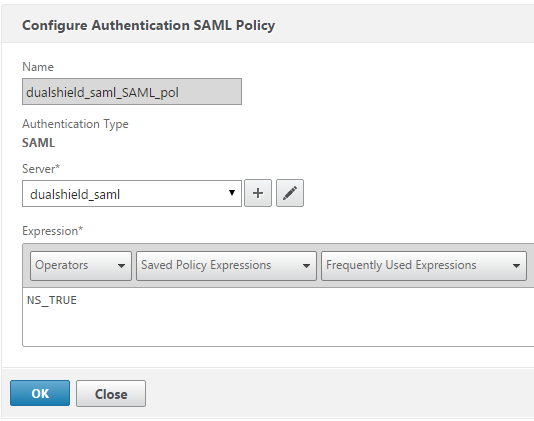
![DualShield MFA Platform > NetScaler Configuration [CTX-XA] > image2015-10-25 1:23:1.png](/download/attachments/35946923/image2015-10-25%201%3A23%3A1.png?version=1&modificationDate=1587385533000&api=v2)
Click "OK"
![DualShield MFA Platform > NetScaler Configuration [CTX-XA] > image2015-10-25 1:31:57.png](/download/attachments/35946923/image2015-10-25%201%3A31%3A57.png?version=1&modificationDate=1587385533000&api=v2)
![DualShield MFA Platform > NetScaler Configuration [CTX-XA] > image2015-10-25 1:34:38.png](/download/attachments/35946923/image2015-10-25%201%3A34%3A38.png?version=1&modificationDate=1587385533000&api=v2)
![DualShield MFA Platform > NetScaler Configuration [CTX-XA] > image2015-10-25 1:35:20.png](/download/attachments/35946923/image2015-10-25%201%3A35%3A20.png?version=1&modificationDate=1587385533000&api=v2)
![DualShield MFA Platform > NetScaler Configuration [CTX-XA] > image2015-10-25 1:43:20.png](/download/attachments/35946923/image2015-10-25%201%3A43%3A20.png?version=1&modificationDate=1587385533000&api=v2)
![DualShield MFA Platform > NetScaler Configuration [CTX-XA] > image2015-10-25 1:50:40.png](/download/attachments/35946923/image2015-10-25%201%3A50%3A40.png?version=1&modificationDate=1587385533000&api=v2)
![DualShield MFA Platform > NetScaler Configuration [CTX-XA] > image2015-10-25 1:54:27.png](/download/attachments/35946923/image2015-10-25%201%3A54%3A27.png?version=1&modificationDate=1587385533000&api=v2)