If you plan to use DualShield as the management service provider for the computer logon modern authentication solution, then it is assumed that you will also use DualShield as the MFA provider.
You can use DualShield as the MFA provider for computer logon in 2 ways. You can use DualShield as the direct MFA provider, or as the indirect MFA provider via Entra EAM (External Authentication Method).
If you use DualShield as the direct MFA provider, then you need to do the following:
In the DualShield Admin Console, navigate to Configuration \ Computer Logon Modern Authentication
Select "Settings" in the sidebar
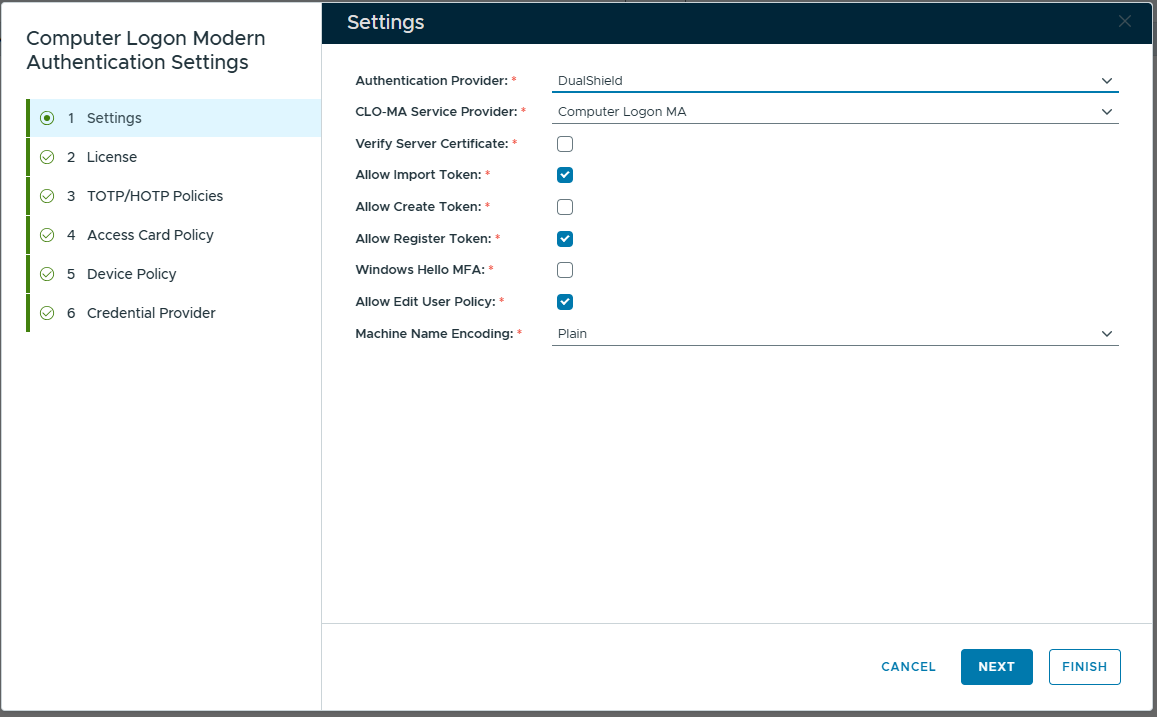
In the "Authentication Provider" box, select "DualShield"
In the "CLO-MA Service Provider" box, select the newly created service provider for computer logon, e.g. Computer Logon MA
If you use DualShield as the direct MFA provider, then you need to do the following: