Follow the steps below to create a logon procedure, Application and SSO IDP and SP configuration on DualShield.
Add a Logon Procedure:
Log on to the DualShield Administration Console and go to Authentication>Logon Procedure |
|
Click on  on the top right.
In the new Logon Procedure window, please enter the following information: | Option | Value |
|---|
| Name: | Enter a friendly name | | Type: | Web SSO |
Click: Save |
|
Add Logon Steps
Select the drop down menu corresponding to the Logon Procedure you will be using and click on Logon Steps. |
|
In the Logon Steps Dialogue box, click the  button.
Tick the desired authentication method, e.g. Static Password |
|
Click Save.
Repeat to add extra steps.
| I have added two steps; Static Password and One-Time Password |
|
Create an Application
Authentication> Applications |
|
Click on on the top right.
In the new Application window, please enter the following information: | Option | Value |
|---|
| Name: | Enter a friendly name | | Realm: | Select your Realm | | Logon Procedure: | Select the Logon Procedure you had created in the previous step |
Click: Save |
|
Bind the Application to an SSO Server Agent
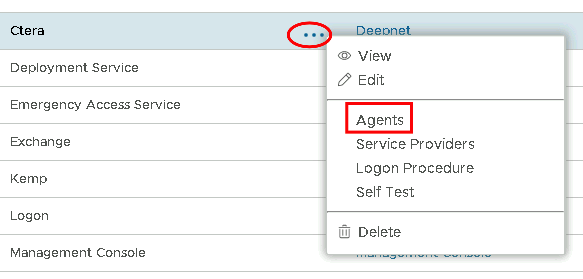
Select the drop down menu corresponding to the Application you will be using and click on Agents. |
|
Tick the box of the SSO Server you will be using and click Save below. |
|
Create a Service Provider Profile
Go to SSO>Service Providers |
|
Click on on the top right.
Fill in the details as per screenshot on right and make sure you select SAML 2.0 as Type, and click on Create Metadata |
|
Copy and paste the following metadata into the Metadata dialogue box. <EntityDescriptor entityID="https://www.imanageshare.com/authn/trusted-relay" xmlns="urn:oasis:names:tc:SAML:2.0:metadata" xmlns:saml="urn:oasis:names:tc:SAML:2.0:assertion" xmlns:ds="http://www.w3.org/2000/09/xmldsig#">
<SPSSODescriptor AuthnRequestsSigned="false" WantAssertionsSigned="true" protocolSupportEnumeration="urn:oasis:names:tc:SAML:2.0:protocol">
<SingleLogoutService Binding="urn:oasis:names:tc:SAML:2.0:bindings:HTTP-POST" Location="https://www.imanageshare.com/authn/trusted-relay"/>
<NameIDFormat>urn:oasis:names:tc:SAML:1.1:nameid-format:emailAddress</NameIDFormat>
<NameIDFormat>urn:oasis:names:tc:SAML:2.0:nameid-format:persistent</NameIDFormat>
<NameIDFormat>urn:oasis:names:tc:SAML:2.0:nameid-format:transient</NameIDFormat>
<AssertionConsumerService Binding="urn:oasis:names:tc:SAML:2.0:bindings:HTTP-POST" Location="https://www.imanageshare.com/authn/trusted-relay" index="0" isDefault="true"/>
</SPSSODescriptor>
</EntityDescriptor> |
|
|
The completed Service Provider dialogue box will look like this: |
|
Click Save.
Download the IDP Metadata file.
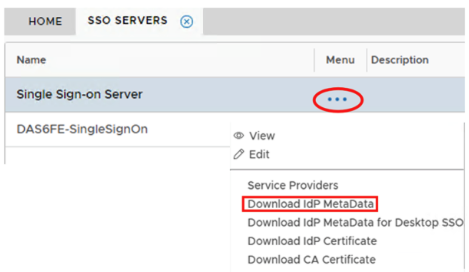
Select the drop down menu corresponding to the SSO server you will be using and click on Download IDP Metadata. |
|