Introduction
The purpose of this task is to remove all audited events logs from the database.
Unlike the similar tasks "Export/Purge old audit trail records" and "Purge old audit trail records", this task will remove all audit trail records, and none of the deleted records are exported. Because the task will fully clear the audit trail without have to work on a record by record basis the truncate option should execute the fastest of the three tasks.
The task can be found by navigating to "Administration | Tasks", then scrolling down to the task "Truncate audit trail";

Task Parameters
This task does not use any task parameters.
Editing and Scheduling the Task
Viewing and Editing the task
The task can be edited by left clicking on the context menu of the task and selecting "Edit";

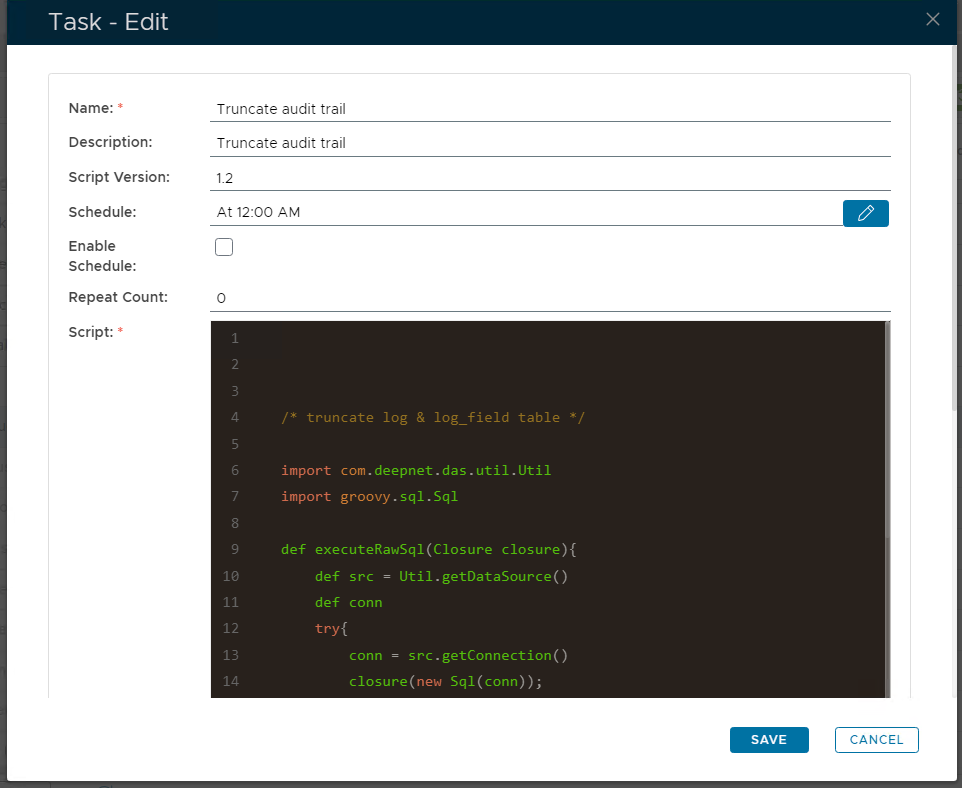
A new window will now open titled "Task - Edit";
|
Enter the name to be assigned to the task within the management console. |
|
Enter a description of what the task will do. |
|
The version number of the task. |
|
This field is used to specify when the task is scheduled to execute. |
|
This field will determine if the task schedule is enabled (if enabled the task will execute at the scheduled time). |
|
Specifies how many times the task should be repeated after the task is executed. |
|
/* truncate log & log_field table */ import com.deepnet.das.util.Util
import groovy.sql.Sql def executeRawSql(Closure closure){
def src = Util.getDataSource()
def conn
try{
conn = src.getConnection()
closure(new Sql(conn));
}finally{
if (conn != null)
conn.close()
}
} def metaInfo = Util.getDatabaseInfo() if(metaInfo.DatabaseProductName=="Microsoft SQL Server"){
executeRawSql{ sql ->
sql.executeUpdate('TRUNCATE TABLE log_field')
sql.executeUpdate('ALTER TABLE log_field DROP CONSTRAINT FK880E243F2474EAC8')
sql.executeUpdate('TRUNCATE TABLE log')
sql.executeUpdate('ALTER TABLE log_field ADD CONSTRAINT FK880E243F2474EAC8 FOREIGN KEY (parent_id) REFERENCES log(id)')
}
}else if(metaInfo.DatabaseProductName=="MySQL"){
executeRawSql { sql ->
sql.executeUpdate('TRUNCATE TABLE log_field')
sql.executeUpdate('set FOREIGN_KEY_CHECKS=0')
sql.executeUpdate('TRUNCATE TABLE log')
sql.executeUpdate('set FOREIGN_KEY_CHECKS=1')
}
}else if(metaInfo.DatabaseProductName.equalsIgnoreCase("Oracle")){
executeRawSql { sql ->
sql.executeUpdate('TRUNCATE TABLE log_field')
sql.executeUpdate('alter table log disable constraint FK1A3442474EAC8')
sql.executeUpdate('alter table log_field disable constraint FK880E243F2474EAC8')
sql.executeUpdate('TRUNCATE TABLE log')
sql.executeUpdate('alter table log_field enable constraint FK880E243F2474EAC8')
sql.executeUpdate('alter table log enable constraint FK1A3442474EAC8')
}
}else {
Util.executeRawSql('TRUNCATE TABLE log_field', [])
Util.executeRawSql('TRUNCATE TABLE log', [])
} |
|
|
Scheduling the Task
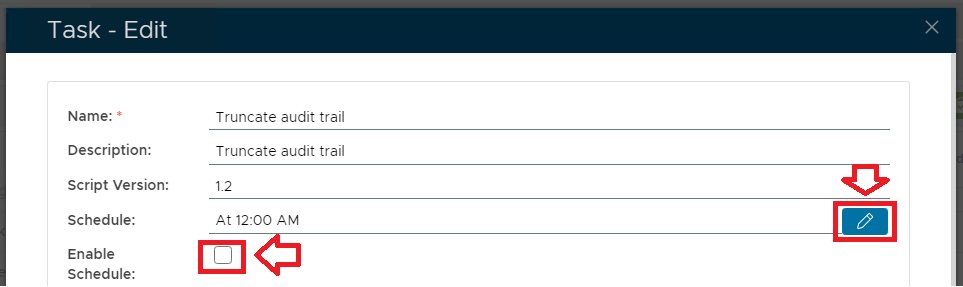
Select the "Enable Schedule" checkbox to ensure the task schedule is activated, then use the pencil icon (" ") to specify the time and frequency settings for automated task execution.
Manual Task Execution
The task can be run manually from the management console by left clicking on the context menu of the task, then selecting "Run";

A new window will open titled "Execute Task" will then open (the window will be populated with the default task property values);
Provide a brief description that will be used to describe the purpose of the task in the audit log.
|
|
|
|
To execute the task click the  button.
